
Regular blog here, 'microblog' there
Many of my traditional blog post live on this site, but a great majority of my social-style posts can be found on my much-busier microbloging site at updates.passthejoe.net. It's busier because my BlogPoster "microblogging" script generates short, Twitter-style posts from the Linux or Windows (or anywhere you can run Ruby with too many Gems) command line, uploads them to the web server and send them out on my Twitter and Mastodon feeds.
I used to post to this blog via scripts and Unix/Linux utilities (curl and Unison) that helped me mirror the files locally and on the server. Since this site recently moved hosts, none of that is set up. I'm just using SFTP and SSH to write posts and manage the site.
Disqus comments are not live just yet because I'm not sure about what I'm going to do for the domain on this site. I'll probably restore the old domain at first just to have some continuity, but for now I like using the "free" domain from this site's new host, NearlyFreeSpeech.net.

(Photo by Hans Gutknecht)
I feel for Evan Prodromou, creator of Pump.io and Status.net before that -- both software platforms for his vitally important Identi.ca social network, which started as a free, open Twitter-like service when one was badly needed in 2008-9.
Running Identi.ca under Status.net required a whole lot of resources, and Evan was doing it for nothing (I think). Then he wanted to change everything about the software and hardware running the identi.ca service and did. So Identi.ca lives. But Identi.ca is not as feature-rich as it was when Status.net was the software behind it.
What's missing from the Pump.io version of Identi.ca for me are a search function and the tags and groups features of the original Identi.ca. I also miss being able to access Identi.ca in most mobile clients, especially Mustard. The new Pump-powered Puma -- with development led by Macno, the same developer who created Mustard -- is coming along, as is the desktop Pumpa client. Like Pump.io itself, neither client is terribly feature-rich at this point.
But what I miss most is the community of the original Identi.ca. I'm not sure how much of that community has scattered since Pump.io, but it sure looks like a lot.
Things that are great about the Pump.io-powered Identi.ca are the ability to do so much more in posts -- more than you can do with Twitter and the original Status.net-powered Identi.ca. But I've found that short Twitter-like posts work for me. It's all about the people ...
I like pump.io's Identi.ca, and I really like Evan. He's given a lot to the community in the form of the Identi.ca service itself and both of its platforms (Status.net and Pump.io).
Today I got a nudge from somebody (ironically via Google Plus) that there's a big #fediverse movement out there centered around the Status.net software.
There's no AMD Catalyst for Fedora 20 in RPM Fusion, but the Fedora 19 packages just keep on getting updated
There still is a packaged version of the AMD Catalyst video driver in RPM Fusion, and it's being updated with each and every kernel release. For Fedora 19.
So what about Fedora 20? The maintainer has made it clear that he's no longer interested in building the package going forward for RPM Fusion, so Fedora 20 users have nothing.
It's lucky (for me anyway) that installing the Catalyst driver direct from AMD isn't as difficult as it was earlier in the F20 cycle. But it's not as easy as installing an RPM package.
If my laptop didn't choke on video (both full screen and windowed in VLC and Totem) and run 30 to 50 degrees hotter with the open Radeon driver, I wouldn't give a damn.
Ah, the "good ol' days." Remember Configuring Fedora 18 to print to HP LaserJet 1020 is a pain in the ass? That was when getting the el-cheapo HP LaserJet 1020 to print in Fedora was merely troublesome.
In Fedora 20? So far it has been impossible. The printer is clearly recognized as being connected by USB because it's listed in the output of lsusb. But the printer is not recognized when I run hp-setup. I can't even get to the part when I download and add the proprietary firmware that should already be inside the printer but isn't because HP hates people.
At least there's already a Fedora bug filed on the problem (to which I've added a "me too.")
On this Fedora 20 system, I have no problem printing to any number of networked printers (all of which happen to be HP devices, but that's besides the point). But the USB printer I have at home? Nope. I'll have to try with a live Xubuntu system to see if the problem is Fedora-specific. (I'd say there's a 99 percent chance of that being the case).
I'd love to see a speedy resolution to this one. I don't print all that often, but it's nice to have the option ... to ... print. Right?
It's been a long time since those halcyon days of mid-2010 through early 2013 when I ran Debian Squeeze and Wheezy on my Lenovo G555 laptop (with AMD CPU and GPU) and had working suspend/resume.
Being able to suspend the laptop and bring it back within seconds by opening the lid changes the way I use the computer. It's pretty much a killer feature. And I've missed it terribly.
It doesn't take much to buy my (operating-system) loyalty. Fedora Linux did it with a working video driver and working suspend/resume.
That and the system not blowing up and all the software I want? That's pretty much all it takes.
It's my holy grail. My holy fucking grail. Suspend/resume.
And I finally figured it out. I've seen the hints about putting a resume=/dev/??? line into the bootline in GRUB, with ??? being the location of the swap partition. I tried it, and it never seemed to work.
So I forgot about it.
Then I saw this post from Ankur Sinha that makes the same suggestion:
resume=/dev/??? in the bootline in GRUB
But what to sub in for ???? Where exactly is /swap?
My system is encrypted and using LVM, so finding /swap is not as easy as using df -h or opening up gParted.
Maybe the system itself could help me figure out where /swap lives in the LVM/encrypted world of Fedora.
I looked at the man page for swapon and soon had my answer:
$ swapon -s
That returns the following:
/dev/dm-1
So I rebooted and dropped this at the end of my bootline in GRUB:
resume=/dev/dm-1
Lo, behold and holy shit, IT WORKS!
I now have working suspend/resume in Fedora 20 -- and presumably every other Linux distribution out there.
Next step, how to modify GRUB so this persists. It's not so easy because GRUB isn't set up the same way in this Fedora U/EFI system as in other systems I've seen.
If/when I figure that out, I'll update this entry. But for now, I HAVE SUSPEND/RESUME. Couldn't be happier. (Really!)
First try at making GRUB modification permanent
I tried to get resume=/dev/dm-1 into GRUB permanently on my EFI-based Fedora system.
Here's what I did.
$ sudo gedit /etc/default/grub
I turned this line:
GRUB_CMDLINE_LINUX="rd.lvm.lv=fedora/swap rd.md=0 rd.dm=0 $([ -x /usr/sbin/rhcrashkernel-param ] && /usr/sbin/rhcrashkernel-param || :) vconsole.keymap=us rd.lvm.lv=fedora/root rd.luks.uuid=luks-f87cd0dc-c2a5-4a18-913d-b0c9d0e7d18f rhgb"
into this:
GRUB_CMDLINE_LINUX="rd.lvm.lv=fedora/swap rd.md=0 rd.dm=0 $([ -x /usr/sbin/rhcrashkernel-param ] && /usr/sbin/rhcrashkernel-param || :) vconsole.keymap=us rd.lvm.lv=fedora/root rd.luks.uuid=luks-f87cd0dc-c2a5-4a18-913d-b0c9d0e7d18f rhgb resume=/dev/dm-1"
Note the added bit at the end.
Then I rebuilt my GRUB entries:
$ sudo grub2-mkconfig -o /boot/efi/EFI/fedora/grub.cfg
GRUB didn't look quite the same upon reboot, but my boot stanza did have resume/dev/dm-1 in it. And suspend/resume still works.
I don't know if this will persist after a kernel update (I suspect it won't), so I'll update this entry when I know more.
Update: While the simple fix below seems to have worked for me, what Fedora experts are sugggesting is slightly more complicated. Start reading here and click through to find the recommended fix. (I suspect that my solution was easier because I didn't install anything until I resolved the SE Linux problem on my system.)
Original post begins here:
It's all over the Fedora forums, mailing lists and bug trackers: A bad update is causing software updates to fail.
It has something to do with SE Linux.
I got my updates to go through and returned the box back to normal with these three commands:
# setenforce 0
# yum update
# setenforce 1
That's it. Everything is back to normal.
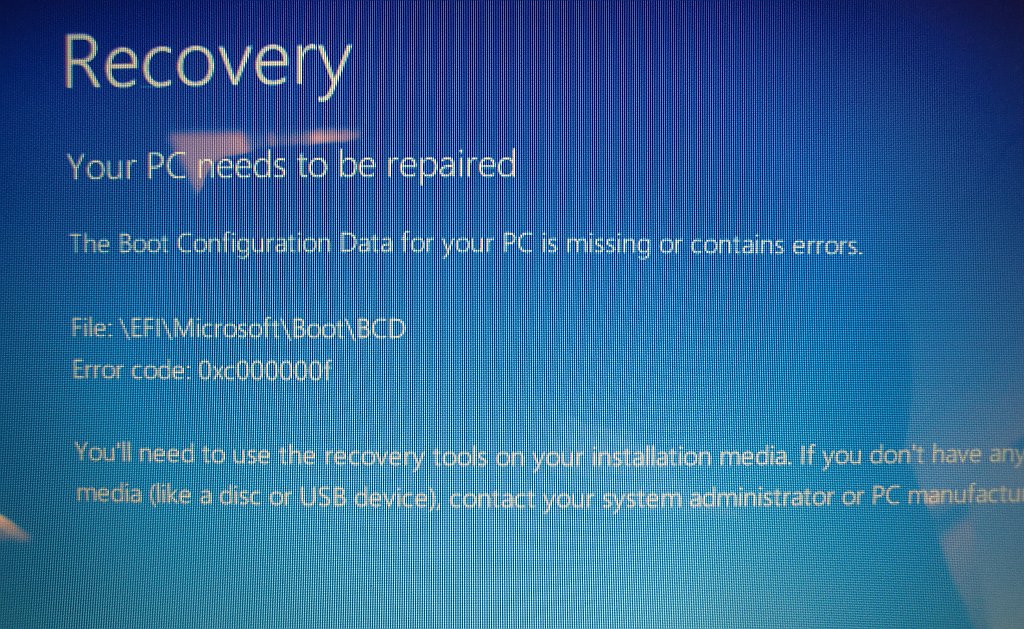
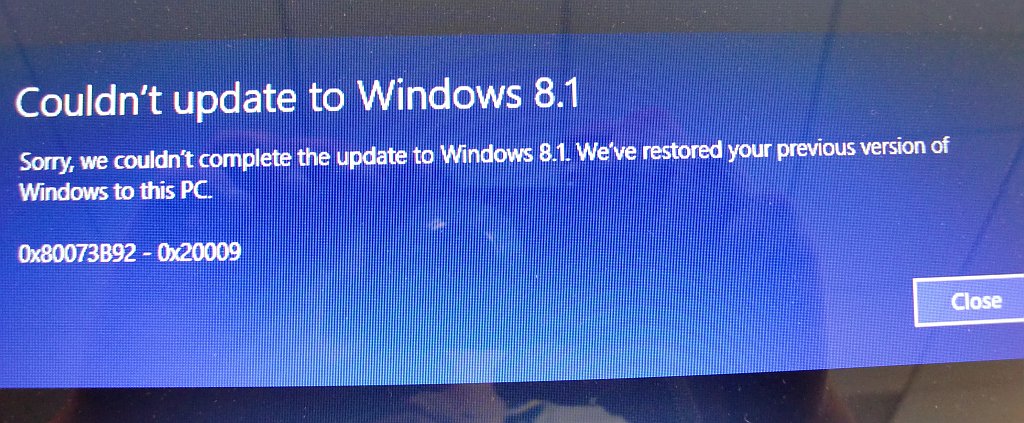
(I used a digital camera to capture the screen images of my Windows boot failure and subsequent 8.1 upgrade failure so you can share in my pain before reading below how I fixed what Microsoft broke)
So I figured I'd upgrade the Windows 8 portion of my Windows/Fedora dual-booting (and naturally EFI-running) system to the presumably shinier, newer Windows 8.1 with the offer of an upgrade via the Microsoft Store.
Big fucking mistake.
I go into Windows 8 and do the upgrade. It tells me at some point that "there will be several reboots."
The first reboot was the last. Windows would no longer boot. (Luckily Fedora continued to boot during this whole nightmare.) When I tried to start Windows 8, I got a blue-screen error with the code 0xc000000f.
I went into Recovery Mode via the BIOS.
The automatic repair didn't work. Then I went to Advanced Options, then to the Windows command prompt, to start trying hacks.
The easy hacks didn't work.
Debian France now has an online store where they sell Debian-related merchandise: hats, shirts, even umbrellas, pocket knives and those "buff" things that losing "Survivor" contestants throw into the fire on the show's Redemption Island (which probably tells you too much about my recent TV viewing).
The currency is Euros, the language French. May the European force be with you.
Current time in UTC
Categories
Counter
There are 865 entries in this blog.
There are 294 images in the filesystem, 187 of which appear in actual posts.
Syntax highlighting
I am using Highlight.js for syntax highlighting.
Social updates
As I say at the top of this site, my social-style entries are posted to a separate Ode blog instance at updates.passthejoe.net. The Ruby script I use to do this is pretty ugly, but I released it on Github anyway. I started working on a version that is much more class-based (as in object-oriented), but that project stalled out a bit. I'm considering bringing this concept to Android, or doing it in Java with a JavaFX GUI, or doing it in Node.js for JavaScript practice.
Archive
The archive is not up to date due to the 2020 hosting migration. I plan to work on it.
Hello, world — this is my website
No databases were harmed in the making of this blog
You're seeing this blog, powered by Ode, through the magic of the Perl programming language and the Common Gateway Interface. Also involved: the Apache web server and Linux operating system.
Ode does not use a database to store content. Instead, every entry exists on the web server as a "flat" text file.
Comments are managed via Disqus, integrated through the work of Ode project leader Rob Reed.
Counter and categories: Thanks to Rob Reed for his help on the Counter addin, which provides the post-count and category features seen above. The show/hide feature is coded with inline JavaScript.
E-mail: stevenhrosenberg@gmail.com.
Who am I
and why am I here?
My name is Steven Rosenberg. Journalist. Programmer. Husband. Father. Fixer of the broken.
License
CC BY-NC-SA

Frugal technology, simple living and guerrilla large-appliance repair by Steven Rosenberg is licensed under a Creative Commons Attribution-NonCommercial-ShareAlike 4.0 International License.
Archives
By year and month
Links
My sites
- RSS of this blog
- Microblog of short posts
- Steven Rosenberg (WordPress)
- Click
- Come on Feel the Nuys
- Steven Rosenberg on Twitter
Ode sites
I support the open web
Powered by
