
Regular blog here, 'microblog' there
Many of my traditional blog post live on this site, but a great majority of my social-style posts can be found on my much-busier microbloging site at updates.passthejoe.net. It's busier because my BlogPoster "microblogging" script generates short, Twitter-style posts from the Linux or Windows (or anywhere you can run Ruby with too many Gems) command line, uploads them to the web server and send them out on my Twitter and Mastodon feeds.
I used to post to this blog via scripts and Unix/Linux utilities (curl and Unison) that helped me mirror the files locally and on the server. Since this site recently moved hosts, none of that is set up. I'm just using SFTP and SSH to write posts and manage the site.
Disqus comments are not live just yet because I'm not sure about what I'm going to do for the domain on this site. I'll probably restore the old domain at first just to have some continuity, but for now I like using the "free" domain from this site's new host, NearlyFreeSpeech.net.
This entry has been rewritten as How I fixed my Fedora 20 system when it stalled before the display manager appeared. I recommend reading that version.
Update: After booting into runlevel 3 (putting the number 3 into the GRUB boot line), I had no trouble logging into a console. Then I attempted to start X, and the system stalled. It was fglrx/Catalyst that was keeping me from getting to the display manager.
I removed AMD Catalyst. The system started working again. But back under the open-source Radeon driver, the laptop was running 20 to 50 degrees hotter than with the proprietary Catalyst driver.
Rather than reinstall Catalyst right away, I decided to try implementing Radeon DPM (Dynamic Power Management). DPM is a feature of Catalyst that is just coming to the open-source Radeon driver.
I'm running kernel 3.12.10, and Radeon DPM won't be implemented by default until 3.13. For now it has to be switched on with a kernel boot parameter.
The last time I tried forcing DPM in GRUB, I didn't get good results. This time it worked great.
I tested it by adding radeon.dpm=1 to the GRUB the boot line. The CPU temperatures and fan speeds were comparable to what they were under Catalyst (cooler and slower, respectively), and 3D hardware acceleration was working.
I did get something else from running Radeon instead of Catalyst: The screen dimming/brightening when running on battery power works (unlike with Catalyst). That means the screen dims when the laptop is not being used but brightens up when you start using it again. With Catalyst you had to manually increase brightness after returning to the machine.
So I modified GRUB to take radeon.dpm=1 permanently (instructions forthcoming).
The Linux gods give. And take. With Radeon (and not Catalyst) I lost suspend/resume. I'm not happy about it.
But having a working system again -- and having it without the bother of an unpackaged, closed-source Catalyst driver -- is a fair tradeoff. For now.
The original, before-I-fixed-it post starts below:
Ever since I got suspend/resume working in Fedora 20, I've been rebooting maybe once a week. That's because I love suspend/resume.
I love being able to close to laptop lid to put the machine to sleep and open the lid to wake it up.
But since the battery was running low last night, I decided to do a full shutdown.
I turned the laptop on today, and it wouldn't boot into Fedora proper.
I can boot into rescue mode, and all my files are there and look fine (that's the good news). But sometime during the boot process it just stalls. And there's nothing I can do to get it to finish booting and give me either a console or desktop.
With the release of Fedora 21 delayed by at least three months due to the ramping up of the Fedora.Next initiative, the project's current release, Fedora 20, is likely to be the closest thing users will ever get to a "long-term support" release from the Red Hat-sponsored community project.
And I plan to enjoy it.
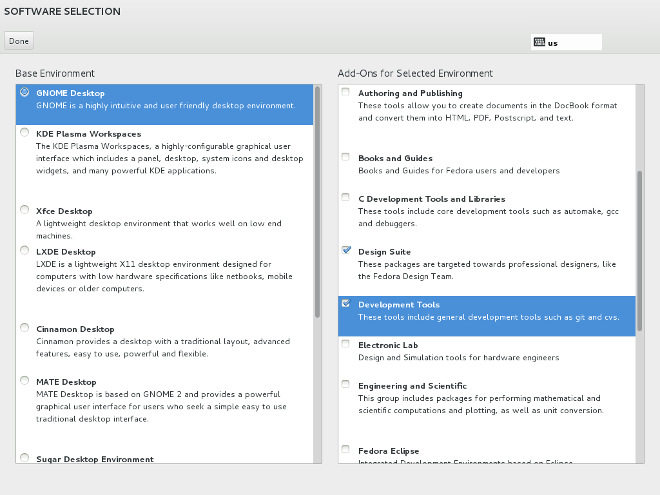
After hearing the Linux Luddites guys talk about how Debian's installer and documentation sort of hide the option to install alternative desktops (though the wiki does cover it) and following the "Fedora.Next" debate on the mailing list about the future of spins, I came across the documentation for Fedora's software-selection "spoke" in the new Anaconda installer.
It's been so long since I've done a Fedora install (I've had this system since about May 2013) that I forgot about the part of the new Anaconda installer that defaults to the GNOME desktop but allows you to deselect GNOME and choose KDE, Xfce, LXDE, Cinnamon, MATE or Sugar and then go back to the "hub" and continue with the installation tasks, eventually (hopefully) ending up with a functioning Linux installation.
Say what you will about the Anaconda installer, especially the new "hub and spoke" version (and much of what has been said is far from kind), but the ability to select any of the major desktops during the installation process is a win.
Not that (as I've noted above) you can't do that with the Debian installer, but amid all the back-and-forth over Fedora spins in Fedora.next, it's nice to know you can download and burn a single Fedora disc or flash drive and use it to install the desktop environment of your choice.
Buddy Burden released the next post in his series on programming, life and everything.
As I said recently, I'm a huge fan.
This one is about "getting shit done":
I’m one of those people who wants to write code to solve every problem that comes along.  If I could figure out how to make a Perl script make my bed, or clean my room, then those things would certainly get done a hell of lot more often.  I’d put it in a cronjob.

I’ve written code to calculate my kids’ allowances, email daily chores to them, track my hours for clients, keep track of info when hiring employees, reset the database for my music player, search for things in my instant messaging logs, organize my music collection, figure out how much space I have left in my Dropbox, balance my checkbook, query package management systems regardless of which flavor of Linux I happen to be running at the moment, calculate Weight Watchers points, track my todo list, count lines of code, print out certain lines from a file, and make a Gimp plugin to help me make cards for my favorite wargame ... and that’s just a small fraction.

...

I write a lot of code, even outside work.  If there’s any obvious way to use code to solve a problem (and sometimes even if the way is non-obvious), I’m going to write a program.  I can’t fix a car, I suck carpentry and plumbing, I’m not very good at yardwork or gardening, and I’m not even particularly useful at administering my family’s eclectic collection of personal computers, laptops, and tablets, but I can write the hell of out of some code.  And I’m the type of person who will gleefully spend days trying to solve a problem with code that I could have probably just done manually in a few hours, because I don’t mind spending days on a program, ’cause it’s fun.  But just because I don’t mind it doesn’t mean I want to do it all the time.  What I’d really prefer is to get in, write the code, and get out.  Just Get Shit Done.  And that’s what Perl lets me do.
That's a programmer, all right. I don't usually drop quotes this big into entries, but there's way more I could have quoted from this excellent entry.
Again, the entire series is essential reading.
Buddy Burden writes a great eight-part series, Perl and Me, on his approach to programming, how he came to code in Perl and what he thinks is wrong (and right) with the profession and teaching of programming.
It's not all about Perl, though much of it is. Every programmer should read it.
My favorite is Perl and Me, Part 7: The Most Powerful Weapon Which You Can Use to Change the World
I would offer a few quotes from Part 7, but the whole thing is so good that you should just go read it now), then go back to Part 1.
So I heard about an update to Skype for Linux (thanks, OMG!Ubuntu) that is supposed to fix some general noise and PulseAudio issues.
Since Skype's RPM for Fedora doesn't set up a repo, I had to download a new RPM from Skype and install it.
The new package, Version 4.2.0.13, runs as well as the old one. That means it fixed none of the audio issues I'm having, which include occasional noisy audio and intermittent lack of audio. The commonly accept fix doesn't help me, either.
Luckily I rarely use Skype, and usually only as an IM client, so I'll live.
For the freedom-lovers in the room, I did install the Ekiga softphone package in Fedora, and it kind of, sort of works. But the UI is HORRIBLE, and I doubt a non-geek could ever make it work. I need a better SIP package, and I'm open to suggestions.
I'm not big on Facebook. Or Medium. It would be a different story if I were getting paid to write for one of those services, but since that isn't happening, I'm indifferent.
But in the face of interfaces that are inviting to authors, plus the promise of exposing your work to a potential audience of millions, a la Medium and the Huffington Post (why I pulled that one out of my unmentionables I don't know, but I just did), Facebook is releasing a mobile app called Paper that promises to remake the way you (and you) interact with the service, especially when it comes to shoveling your content into their always-burning furnace:
Re/code: Meet “Paper,” Facebook’s New Answer for Browsing — And Creating — Mobile Media -- By Mike Isaac
 Most interesting read before 5 a.m. (yes, I'm up that early these days):
Did I play D&D "back in the day"? A little bit. Would I play it again? I might.
 An extremely cautionary tale on broken iMacs, Apple's relative indifference, and how barbaric this all seems in relation to hardware from other vendors:
Readwrite: How I Fixed An iLemon -- Repairing a Mac is no simple task — take it from someone who worked at Apple for 20 years by David Sobotta

(Photo by Hans Gutknecht)
Current time in UTC
Categories
Counter
There are 865 entries in this blog.
There are 294 images in the filesystem, 187 of which appear in actual posts.
Syntax highlighting
I am using Highlight.js for syntax highlighting.
Social updates
As I say at the top of this site, my social-style entries are posted to a separate Ode blog instance at updates.passthejoe.net. The Ruby script I use to do this is pretty ugly, but I released it on Github anyway. I started working on a version that is much more class-based (as in object-oriented), but that project stalled out a bit. I'm considering bringing this concept to Android, or doing it in Java with a JavaFX GUI, or doing it in Node.js for JavaScript practice.
Archive
The archive is not up to date due to the 2020 hosting migration. I plan to work on it.
Hello, world — this is my website
No databases were harmed in the making of this blog
You're seeing this blog, powered by Ode, through the magic of the Perl programming language and the Common Gateway Interface. Also involved: the Apache web server and Linux operating system.
Ode does not use a database to store content. Instead, every entry exists on the web server as a "flat" text file.
Comments are managed via Disqus, integrated through the work of Ode project leader Rob Reed.
Counter and categories: Thanks to Rob Reed for his help on the Counter addin, which provides the post-count and category features seen above. The show/hide feature is coded with inline JavaScript.
E-mail: stevenhrosenberg@gmail.com.
Who am I
and why am I here?
My name is Steven Rosenberg. Journalist. Programmer. Husband. Father. Fixer of the broken.
License
CC BY-NC-SA

Frugal technology, simple living and guerrilla large-appliance repair by Steven Rosenberg is licensed under a Creative Commons Attribution-NonCommercial-ShareAlike 4.0 International License.
Archives
By year and month
Links
My sites
- RSS of this blog
- Microblog of short posts
- Steven Rosenberg (WordPress)
- Click
- Come on Feel the Nuys
- Steven Rosenberg on Twitter
Ode sites
I support the open web
Powered by
