
Regular blog here, 'microblog' there
Many of my traditional blog post live on this site, but a great majority of my social-style posts can be found on my much-busier microbloging site at updates.passthejoe.net. It's busier because my BlogPoster "microblogging" script generates short, Twitter-style posts from the Linux or Windows (or anywhere you can run Ruby with too many Gems) command line, uploads them to the web server and send them out on my Twitter and Mastodon feeds.
I used to post to this blog via scripts and Unix/Linux utilities (curl and Unison) that helped me mirror the files locally and on the server. Since this site recently moved hosts, none of that is set up. I'm just using SFTP and SSH to write posts and manage the site.
Disqus comments are not live just yet because I'm not sure about what I'm going to do for the domain on this site. I'll probably restore the old domain at first just to have some continuity, but for now I like using the "free" domain from this site's new host, NearlyFreeSpeech.net.
This is what happens when you create a file in the Windows Subsystem for Linux and try to edit it with a Windows application
As I experiment with the Windows Subsystem for Linux (aka the Bash shell provided by Ubuntu for Windows 10), I am trying to figure exactly what I can and can't do.
To that end, I created a file with Vim in the WSL. Then I tried to open it with a text editor in Windows. I get this popup that says I can't do it:

In case you're not seeing the image above (and because Google), the Error dialog reads:
Error saving file.
Error renaming temporary file: Permission denied
The file on disk may not be truncated!
I also tried to use the Windows file manager to drop the above image, created in Windows, into the WSL portion of the disk. That file "shows" in the Windows file manager, but it doesn't appear at all in the Bash shell. I had to use Bash to copy it from the Windows side to the WSL/Linux side: That's what works, in case you were wondering.
I really need an easy drag/drop between Windows and the WSL ...
Update: This issue is addressed in a very interesting bug report with a lot of links I need to explore.
Also, in the image file I copied from Windows into Bash on Windows (as Microsoft seems to like to call it), the .jpg file was too wide open on permissions. It was 777, and I wanted 644. I made the change in Bash and am syncing with the server.
Update: While it seems fairly easy and routine to create and edit files on the Windows side of the filesystem using both Windows and WSL/Linux applications, when I tried to use the WSL-based Unison to sync files onto the Windows filesystem, I got a ton of permission errors and a failed sync. So the "dream" of maintaining a Windows system with WSL utilities probably won't happen. The two solutions for this particular problem are a) use Windows utilities on the Windows side and b) use Linux utilities on the WSL side.
The original entry begins here:
Now that I have my new HP Envy 15-as133cl laptop running Windows 10 and have added the Windows Subsystem for Linux, I'm exploring just how many of my regular Linux tasks I can do in this Ubuntu-supplied Bash shell, what I can do with similar programs compiled for Windows, and what really needs a dedicated Linux partition (or full computer).
Chief among these tasks is updating/syncing/backing up my Ode-generated blog (the one you're reading right now).
The first thing I learned about the Windows Subsystem for Linux (WSL for short) is that you can access the files you create in the WSL via the Windows file manager, but any modifications you make on the Windows side will not, I repeat WILL NOT be reflected in what you can see on the Linux side.
I'm not in Windows 8 so often (except for the past two days) that on the rare occasions when I do load it up I am at all happy to wait a half-hour or more for the machine to shut down because it's downloading and installing dozens of updates.
I turned automatic updates off. When I have time, I'll boot into Windows 8 and do the updates manually.
In an attempt to get a handle on Windows 8 performance on this hardware, I installed SpeedFan 4.49.
Quick tip. Avoid crapware and get the download here.
SpeedFan isn't pretty, but it works well. I can monitor CPU, GPU and disk temperatures. It also keeps an eye on GPU voltage, CPU frequency, battery charge state, uptime and CPU load.
SpeedFan can also manually adjust your fan speeds. I'm not interested in that so much, but I thought I'd throw it out there.
In case you're wondering, Windows 8 doesn't run any cooler on this HP Pavilion g6 than Fedora 20 with either the proprietary Catalyst driver or the open Radeon driver with Radeon DPM activated.
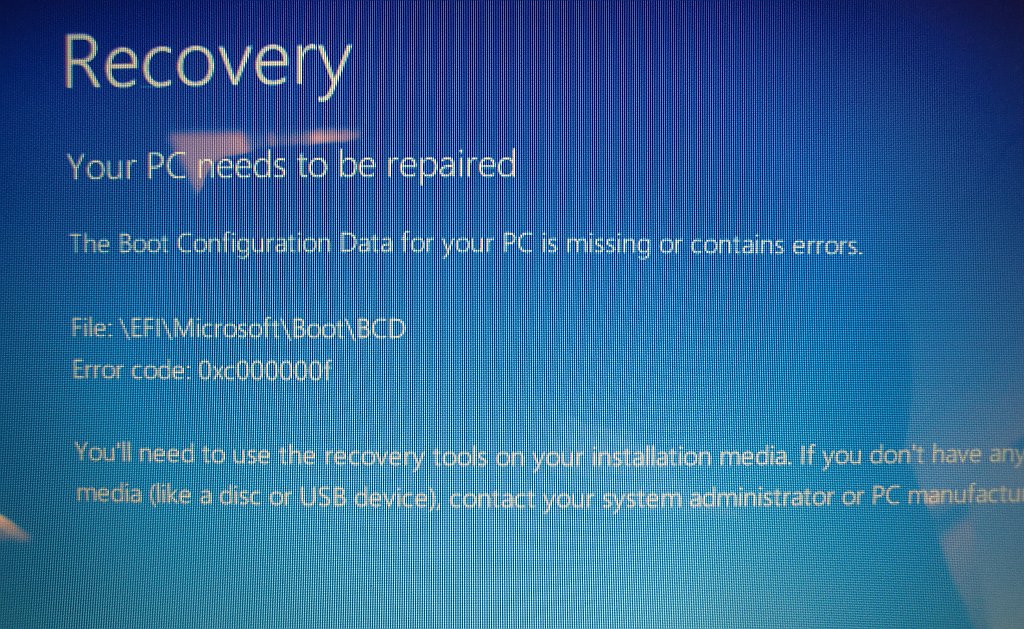
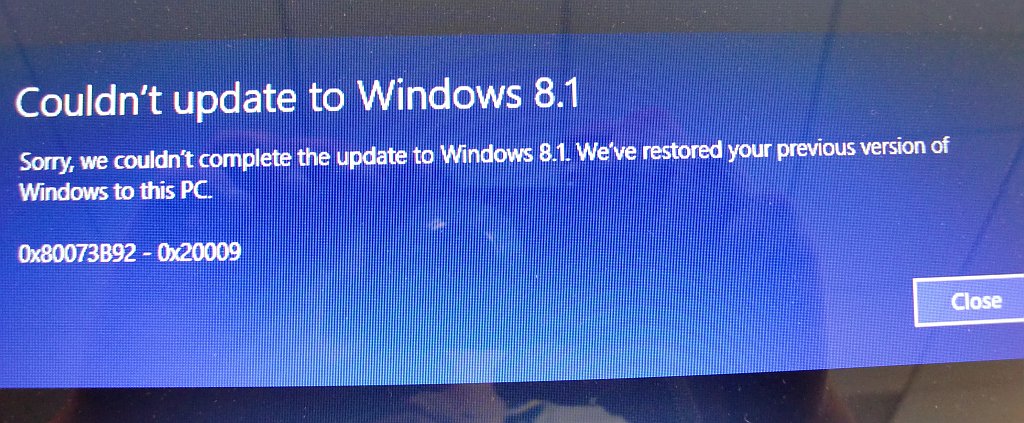
(I used a digital camera to capture the screen images of my Windows boot failure and subsequent 8.1 upgrade failure so you can share in my pain before reading below how I fixed what Microsoft broke)
So I figured I'd upgrade the Windows 8 portion of my Windows/Fedora dual-booting (and naturally EFI-running) system to the presumably shinier, newer Windows 8.1 with the offer of an upgrade via the Microsoft Store.
Big fucking mistake.
I go into Windows 8 and do the upgrade. It tells me at some point that "there will be several reboots."
The first reboot was the last. Windows would no longer boot. (Luckily Fedora continued to boot during this whole nightmare.) When I tried to start Windows 8, I got a blue-screen error with the code 0xc000000f.
I went into Recovery Mode via the BIOS.
The automatic repair didn't work. Then I went to Advanced Options, then to the Windows command prompt, to start trying hacks.
The easy hacks didn't work.
In the course of my day job, I use Windows 7 all day. I have really nice Lenovo desktop hardware with a nice AMD processor and lots of RAM. Windows 7 is fairly solid. It's not Linux, but when compared to Windows XP, it's a world and a half better.
So is Windows 8 better than Windows 7? I still dual-boot Windows 8 on my laptop, a newish HP Pavilion g6 with an AMD CPU and enough RAM to be comfortable.
The Metro interface is distracting, looks terrible and doesn't add to productivity. In a keyboard-mouse environment, it's hard to know what to do to make Metro (or whatever it's called now) do what I want. It's not intuitive.
The desktop portion of Windows 8 seems much like Windows 7. That is good.
I'm not saying I'm a Luddite. And I'm not saying I'm not. But there's nothing in Windows 8 that makes me say, "this is better."
There are so many things wrong with the Windows model from the perspective of a user who prefers Linux (currently Fedora, though I'm thisclose to moving to Debian or Xubuntu), but when it comes to basic functionality, I can get along fairly well in Windows 7. Windows 8? I can't believe it's gone on this long.
Unfortunately the Xubuntu 13.04 live DVD ate it.
I was trying to run Thunar with gvfs to open a file over FTP in the Mousepad text editor. The thing crashed and wiped out the data in the file.
So my Windows 8 post is gone.
No big loss, I suppose.
I'm rebuilding it (as a Xubuntu post).
To see if Mousepad is the problem, I installed gEdit in the live environment. You can do things like that with Linux: Try whole systems out with live media and even add software until your memory runs out.
It's fucking awesome.
If you see these words, it worked.
Current time in UTC
Categories
Counter
There are 865 entries in this blog.
There are 294 images in the filesystem, 187 of which appear in actual posts.
Syntax highlighting
I am using Highlight.js for syntax highlighting.
Social updates
As I say at the top of this site, my social-style entries are posted to a separate Ode blog instance at updates.passthejoe.net. The Ruby script I use to do this is pretty ugly, but I released it on Github anyway. I started working on a version that is much more class-based (as in object-oriented), but that project stalled out a bit. I'm considering bringing this concept to Android, or doing it in Java with a JavaFX GUI, or doing it in Node.js for JavaScript practice.
Archive
The archive is not up to date due to the 2020 hosting migration. I plan to work on it.
Hello, world — this is my website
No databases were harmed in the making of this blog
You're seeing this blog, powered by Ode, through the magic of the Perl programming language and the Common Gateway Interface. Also involved: the Apache web server and Linux operating system.
Ode does not use a database to store content. Instead, every entry exists on the web server as a "flat" text file.
Comments are managed via Disqus, integrated through the work of Ode project leader Rob Reed.
Counter and categories: Thanks to Rob Reed for his help on the Counter addin, which provides the post-count and category features seen above. The show/hide feature is coded with inline JavaScript.
E-mail: stevenhrosenberg@gmail.com.
Who am I
and why am I here?
My name is Steven Rosenberg. Journalist. Programmer. Husband. Father. Fixer of the broken.
License
CC BY-NC-SA

Frugal technology, simple living and guerrilla large-appliance repair by Steven Rosenberg is licensed under a Creative Commons Attribution-NonCommercial-ShareAlike 4.0 International License.
Archives
By year and month
Links
My sites
- RSS of this blog
- Microblog of short posts
- Steven Rosenberg (WordPress)
- Click
- Come on Feel the Nuys
- Steven Rosenberg on Twitter
Ode sites
I support the open web
Powered by
