
Regular blog here, 'microblog' there
Many of my traditional blog post live on this site, but a great majority of my social-style posts can be found on my much-busier microbloging site at updates.passthejoe.net. It's busier because my BlogPoster "microblogging" script generates short, Twitter-style posts from the Linux or Windows (or anywhere you can run Ruby with too many Gems) command line, uploads them to the web server and send them out on my Twitter and Mastodon feeds.
I used to post to this blog via scripts and Unix/Linux utilities (curl and Unison) that helped me mirror the files locally and on the server. Since this site recently moved hosts, none of that is set up. I'm just using SFTP and SSH to write posts and manage the site.
Disqus comments are not live just yet because I'm not sure about what I'm going to do for the domain on this site. I'll probably restore the old domain at first just to have some continuity, but for now I like using the "free" domain from this site's new host, NearlyFreeSpeech.net.
Since my home Internet connection has been so bad, I haven't been using my Fedora 22 laptop as my main production machine for Citrix apps, and that means I can run GNOME 3 on it without trouble.
Instead, I use the laptop for writing, web browsing, development and watching media.
And instead of my usual Xfce, I've been using GNOME 3.16 as the desktop environment.
I have few complaints. GNOME 3 is getting better and better with each release, and even between releases there have been little improvements here and there.
Right now my only complaint with GNOME 3 is with file management in Nautilus. When you drag a file into a folder, if you linger too long over the folder, you end up in it. That should be something you can configure not to happen.
To avoid this problem, I've been using Nautilus' move to feature. It's clean.
My problems with the upper panel (I'm using the TopIcons GNOME Extension) are pretty much gone. Everything shows like it's supposed to.
I like the notifications system.
GNOME Software's notion that you want to reboot for every update is absurd. I use the Yum Extender for DNF to update, and that doesn't require any rebooting. The new Yum Extender fails about 25 percent of the time. I'm confident that the Fedora team will continue polishing the application. In the meantime, dnf in the terminal works without fail.
I'm having a PulseAudio issue that presents itself in both GNOME and Xfce: When I switch audio to HDMI via PulseAudio Volume Control (aka pavu), there is no audio over that connection unless I log out and log back in. I can switch back to local audio and hear it on the laptop speakers, but going back to HDMI requires another logout/login. This fairly recent issue is not a deal-breaker but is annoying.
Otherwise, my 2-year-old HP Pavilion g6 laptop is running better than ever under Linux.
Notes:
While I said I was going to stop obsessing about Linux, I reserve the right to talk/write about software I'm using. Tools are still interesting. And important. My focus remains on programming. And the rest of life. (Or so I tell myself.)
I am getting ready to pull the trigger on 100Mb/s Time Warner Cable broadband to replace my sub-1Mb/s DSL Extreme "broadband." That would mean I could work at home more, and I would probably swing back to Xfce for production because it plays so much better with the unwieldy Citrix apps I must use.
It's not that I don't like virtual desktops (aka workspaces) in Linux.
On the contrary, I love them.
But when I'm using the horrible Citrix-delivered applications my company provides, switching to another workspace (or virtual desktop) causes those apps to lose their connection to the server.
So I have to be disciplined in order not to switch to another workspace.
In Xfce I removed the desktop pager from my panel.
And just now in GNOME 3, I was searching for an Extension that would do this for me. I found an out-of-date Extension that included a very good workaround in the comments:
This extension didn't work for me on Fedora 20/GNOME 3.10. Instead I used GNOME Tweak Tool and set the 'Workspace Creation'=Static and only 'Number of Workspaces'=1.
I already have GNOME Tweak Tool, since you really can't run GNOME 3 (successfully anyway) without it. I went into the Workspaces portion of the utility and made the changes.
Now my Workspaces are gone, as is the ability to even go to them with ctrl-alt up/down-arrow, and I should be safer than ever to use GNOME Shell for my Citrix work ... unless minimizing apps, or switching between them, kills the connection.
Update: Switching between applications, including my Citrix-delivered ones, and minimizing them with the Super (aka Windows) key or mousing into the hot corner does NOT cause the Citrix apps to lose their connection to the server.
So we can call this a win. I'll know for sure when I try to do a full day of production in GNOME 3 on Monday.
After reading about it on one of the Fedora mailing lists, I hunted down and installed the TopIcons extension to GNOME Shell so the Dropbox icon shows up and persists in the upper panel.
So far I'm very happy with it.
I'm experimenting, as it were, with GNOME Shell and the GNOME Classic version of same, now that I'm using the open Radeon video driver and not the closed AMD Catalyst version (the latter of which does not play well with GNOME 3 at this point in time).
I finally did figure out suspend/resume in Radeon on my hardware (which I will write up at some point soon), so I'm able to run GNOME 3/Shell in addition to my go-to desktop Xfce. Suspend/resume has been a little squirrely at times, so I'm experimenting with it more than just a little before I declare myself satisfied with the fix.
Part of this means getting my GNOME Shell Extensions situation together so the environment isn't so user-unfriendly. To me anyway.
Jordi Mallach says GNOME should remain the default desktop environment in Debian Jessie -- and why I agree
 Jordi Mallach details in a post I found via Google Plus why GNOME should remain the default desktop environment in Debian Jessie despite the usual switch to Xfce prompted by a desire to keep the ISO image at CD size.
There's more. And it's not just image size: Most use Debian's netinstall image, which is always much smaller than a traditional data CD, and I think many if not most have access to a DVD drive or bypass optical media entirely for USB flash drives, so size doesn't matter as much as it might.
The dust-up over GNOME 3's controversial desktop is nothing new. Many will never like it. Cue irony: Windows 8, UI-wise, is as crazy as GNOME 3. They make the current Mac OS X desktop look positively old-school. That's probably drawing more to OS X than it is the other direction (to GNOME and Windows 8).
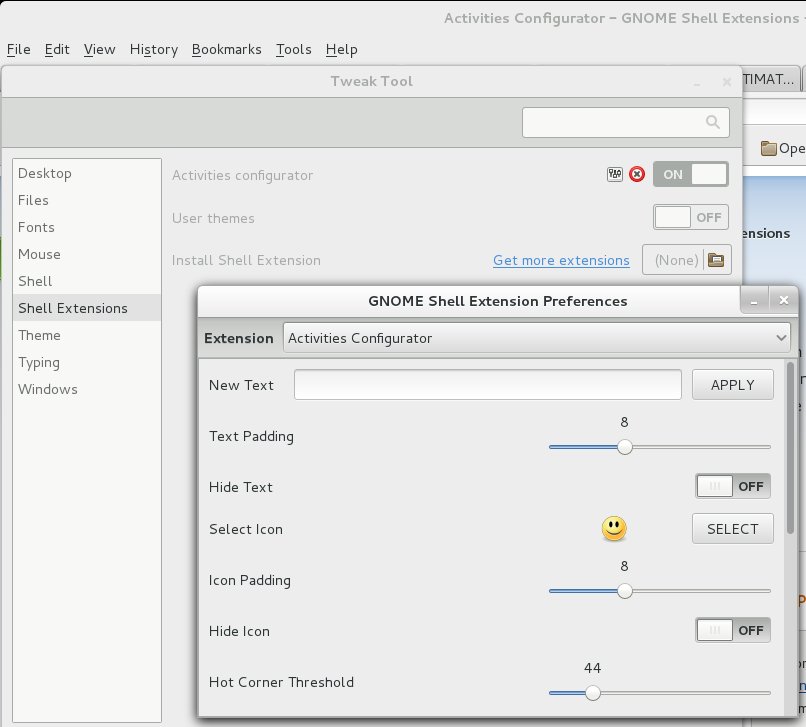 It kept nagging at me. Why was the "hot corner" in Debian's version of GNOME 3 so "sensitive," compared to the GNOME 3 desktop's hot corner in Fedora 19?
In Fedora, I'd mouse into the upper left "hot corner," and half the time wouldn't get the app panel or search box to open. I'd have to "aggressively" mouse to get it working.
So I've been using GNOME 3 less and less. Was it just too slow?
Today I did a bit of searching and found out that "hot corner" sensitivity was something that the user can set, not in stock GNOME 3 but with the Activities Configurator extension.
I installed the extension and cranked the sensitivity number way down, from 100 to 43, making it more sensitive. Now my "hot corner" is much more responsive to mouse movement, and GNOME 3 is easier to use.
Once you have the extension installed, you can access its settings via the GNOME Tweak Tool, or by right-clicking on the "Activities" menu or the little smiley face that now appears to its left.
The title says it all: I just added the Axe Menu GNOME Shell Extension to my Debian Wheezy system.
After complaining a bit about the lack of a menu in GNOME 3/Shell and not liking the last GNOME Shell Extension I tried to get a menu back, I decided to go to the GNOME Shell Extensions web site again. There I found the Axe Menu. Liking it so far.
Current time in UTC
Categories
Counter
There are 865 entries in this blog.
There are 294 images in the filesystem, 187 of which appear in actual posts.
Syntax highlighting
I am using Highlight.js for syntax highlighting.
Social updates
As I say at the top of this site, my social-style entries are posted to a separate Ode blog instance at updates.passthejoe.net. The Ruby script I use to do this is pretty ugly, but I released it on Github anyway. I started working on a version that is much more class-based (as in object-oriented), but that project stalled out a bit. I'm considering bringing this concept to Android, or doing it in Java with a JavaFX GUI, or doing it in Node.js for JavaScript practice.
Archive
The archive is not up to date due to the 2020 hosting migration. I plan to work on it.
Hello, world — this is my website
No databases were harmed in the making of this blog
You're seeing this blog, powered by Ode, through the magic of the Perl programming language and the Common Gateway Interface. Also involved: the Apache web server and Linux operating system.
Ode does not use a database to store content. Instead, every entry exists on the web server as a "flat" text file.
Comments are managed via Disqus, integrated through the work of Ode project leader Rob Reed.
Counter and categories: Thanks to Rob Reed for his help on the Counter addin, which provides the post-count and category features seen above. The show/hide feature is coded with inline JavaScript.
E-mail: stevenhrosenberg@gmail.com.
Who am I
and why am I here?
My name is Steven Rosenberg. Journalist. Programmer. Husband. Father. Fixer of the broken.
License
CC BY-NC-SA

Frugal technology, simple living and guerrilla large-appliance repair by Steven Rosenberg is licensed under a Creative Commons Attribution-NonCommercial-ShareAlike 4.0 International License.
Archives
By year and month
Links
My sites
- RSS of this blog
- Microblog of short posts
- Steven Rosenberg (WordPress)
- Click
- Come on Feel the Nuys
- Steven Rosenberg on Twitter
Ode sites
I support the open web
Powered by
