
Regular blog here, 'microblog' there
Many of my traditional blog post live on this site, but a great majority of my social-style posts can be found on my much-busier microbloging site at updates.passthejoe.net. It's busier because my BlogPoster "microblogging" script generates short, Twitter-style posts from the Linux or Windows (or anywhere you can run Ruby with too many Gems) command line, uploads them to the web server and send them out on my Twitter and Mastodon feeds.
I used to post to this blog via scripts and Unix/Linux utilities (curl and Unison) that helped me mirror the files locally and on the server. Since this site recently moved hosts, none of that is set up. I'm just using SFTP and SSH to write posts and manage the site.
Disqus comments are not live just yet because I'm not sure about what I'm going to do for the domain on this site. I'll probably restore the old domain at first just to have some continuity, but for now I like using the "free" domain from this site's new host, NearlyFreeSpeech.net.

The more I think about it, GNOME's renaming of applications with a clear word as to what they do is a good thing to do.
The file manager Nautilus is now called Files.
The web browser Epiphany is now called Web.
I believe that Totem will eventually be Movies (or something like that).
Sure it makes it hard to manage these applications when you don't have them installed.
But when you install a Linux distribution (or eventually a BSD system that runs GNOME 3) with a complete GNOME environment, users won't be confused and need to scale a steep learning curve to figure out what they need to click to find ... Files. And the Web. And what they need to click to watch video (like "Movies").
I will ignore the fact that Epiphany (now Web) as a browser is not quite ready for prime time, and almost all users will need and want Firefox or Chromium/Chrome (or Opera for those who love Opera). Maybe Epiphany will get up to speed. By that I mean it will get Flash support.
But overall, simple declarative names for core applications is a good idea. Maybe they'll retain their descriptive package names (Epiphany, Nautilus, Totem, Gedit, etc.). Or maybe they'll have a GNOME-appended package name (gnome-web, gnome-files, gnome-movies, gnome-text-editor). That would make package management more sane.
But for users coming to the GNOME desktop for the first time, clear and simple application names gets them going that much faster.
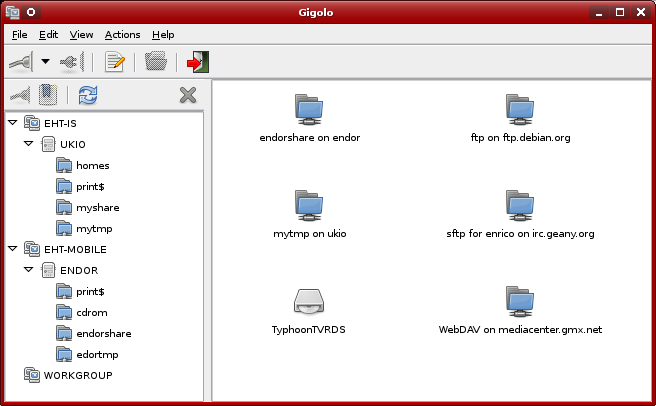
I get why they called it Gigolo. It's the Xfce utility that "mounts anything without complaining."
The things it mounts include ftp and sftp over the network, WebDAV and Windows shares. I'd rather not use it at all, but in Xfce's Thunar file manager, you still need Gigolo to access these remote filesystems.
But since I'm using GNOME and the Nautilus file manager, which is advertised as having baked-in ability to access sftp/ftp and various other networked filesystems, you'd think I'd have no need for Gigolo.
Unfortunately this isn't true.
As often as I create bookmarks in Nautilus to my often-used sftp/ftp sites, they disappear. I don't know why. I've blogged about it recently but find no bug reports.
And though it may be due to the ftp sites I'm using, after a certain period of neglect, during which I don't access a given ftp site after doing so earlier in the session, Nautilus either disconnects or is disconnected from a given ftp server and won't reconnect. Thunar seems to do a better job or reinitiating the connection, but Gigolo is a quick way to "respawn" said ftp connection and get it working again with my file manager, be it Thunar or Nautilus.
But what's really annoying is continually losing my ftp bookmarks in Nautilus. This never happens in Gigolo. It may be awkward, poorly designed and cringe-inducingly named, but it does what it says.
All is not peaches, cream, furry kittens and puppies in GNOME 3. Why are the bookmarks I've created to FTP sites in Nautilus disappearing?
To write today's flurry of blog posts, I opted to use a bookmark in Xfce's Gigolo (yes, the app's name is extremely unfortunate) to access the server where these files live via sftp. At least Gigolo remembers where I've been. I'll try again with Nautilus.
Once you start mousing into the "hot corner" in Xfce, GNOME Classic, or plain old GNOME 2 -- all systems where there is no "hot corner," you pretty much know you've committed to GNOME 3 and GNOME Shell.
I'm not trying to be a GNOME Shell fanboy. It doesn't gain me any credibility not to hate on GNOME 3.
But I gave GNOME Shell a try (GNOME 3.4.2 in Debian Wheezy, to be exact), and despite having GNOME Classic, Xfce 4.8, even Fvwm and Fluxbox, on this machine, I'm using the Shell 98 percent of the time.
Once my muscle memory drags me over to the hot corner, it's nice for it to actually be there.
It's easy to get native Linux apps in the menu bar on the left side of the screen in GNOME 3 / GNOME Shell. They appear there when you run them from the Applications tab, and you can right-click on them in the bar and cause them to persist.
Not so with Wine apps. The only Wine app I'm really using right now is the photo editor/viewer IrfanView (p.s. I didn't need to add mfc42.dll to make it work!!), and when I run it from the Applications tab, I don't get an IrfanView icon in the GNOME menu bar. Instead I get a "windows loader" icon. And besides not persisting, that icon won't run IrfanView.
But this will work:
Go to the Applications tab (hot-corner or Super key), then click Applications, or just type the first few letters of your Wine application into the box.
At this point, don't start the app. Instead, drag the icon into the menu bar on the left side of the screen.
Now that icon will persist in the menu bar (is that what they call that thing on the left side of the screen, or is it the "application bar"? If you really know what's it's called, please let me know).
And the icon will launch the Wine app to which it's tied.
Problem solved -- for me, anyway (and hopefully for you).
How I got rid of multiple icons in the Applications tab of GNOME 3 ... temporarily anyway (but full solution is forthcoming)
Note: I figured it out!!! I will write up the solution to the multiple-application-icon problem tomorrow sometime in the near future.
Meanwhile, here's the entry I wrote earlier today:
I'm running GNOME Shell (aka GNOME 3) in Debian Wheezy, and when I go to the applications tab (mouse into the "hot corner," or hit the "super" key, then either click on Applications or just start typing the first letters of your desired app), I had been getting multiples of the same application, one version with a detailed icon, another with a fuzzy, bitmapped icon.
There are quite a few "recipes" on the Web for solving this problem, but most are from 2011, and with GNOME and the distribution in general undergoing a lot of changes, I wasn't optimistic that anything would work.
This easy fix did work for me, albeit temporarily; only in the current session. If you feel like trying it, it's easy enough. Basically open up a terminal and use your rootly powers (I use sudo for that purpose, but you can su to root if you wish) to do the following:
$ sudo update-menus
My multiple-icon problem was cleared up ... until I logged out. When I logged in again, I had multiple icons. I could run update-menus in a startup script, but that's not terribly elegant.
As much as hating GNOME 3/Shell would put me in good company, I find myself liking it just fine.
I installed Xfce 4.8 on this Wheezy laptop, and while I like that environment well enough, I've pretty much moved back to GNOME in the weeks since.
I'm OK with the hot corner, the virtual desktops that pop up (and go away) on demand and hitting the Windows/Super key to enter command/hot-corner mode.
I have the GNOME Tweak Tool, and I've installed a few GNOME 3 Extensions from the web site. But just a few. Most of the Extensions I've seen are fairly frivolous/unhelpful.
After I installed Wine (not as easy as it should be in 64-bit Debian) and then IrfanView, it took a little doing to get the photo viewing/editing application to show up in the GNOME 3 applications menu, and I still can't get it to show in the applications bar on the left (where it presents as a generic Wine launcher). No problems with that in Xfce, of course, but I can still "hot corner" my way to IrfanView whenever I want. I'm using Fotoxx half the time anyway, so that is less of a problem.
I still love Nautilus and Gedit, and while I continued using the GNOME text editor all of the time and Nautilus some of the time in Xfce, once I determined that the 3D effects in GNOME Shell take CPU when they're under way but give it back soon thereafter, I felt that the productivity boost was (and is) well worth it. Compared to what a Web browser sucks from CPU and memory (and often doesn't give back), GNOME Shell is thrifty.
I am in the process of looking into CentOS-derived Stella, which provides nearly all of the desktop packages and codecs I need day to day. But for my main production machine, I will be sticking with newer systems (Debian, Ubuntu, Fedora, or "other").
It wasn't all that long ago that the KDE desktop environment made a major leap from version 3 to 4, leaving a lot of the old functionality behind without having the new polished enough to keep users happy.
And now GNOME has thrown out its own version 2 bathwater for a new GNOME 3/Shell desktop paradigm in which the window manager is radically different but the critical "furniture" of the environment in the form of applications such as Gedit, NetworkManager, GDM, etc., remain largely the same.
It's going to get worse before it gets better. GNOME is about to pour extra fuel on this particular fire as a very important piece of that furniture -- the Nautilus file manager -- is about to undergo a "dumbing down" to make it more touchscreen/mobile friendly, even though GNOME doesn't appear to run on any mobile or touchscreen devices at this particular point in time.
So do you think GNOME is taking an especially hard pounding for the changes in version 3? Do you think KDE was criticized as much, or more? Did KDE finally acquit itself with later versions in the 4.x series? (I know they never managed to get their office suite back on track.)
And will this all blow over for GNOME, or will the Linux community (and what's left of the BSD-running GNOME community) leave it for dead?
(There's irony; I'm writing this post directly to the web server over sftp entirely in GNOME 3 using Nautilus and Gedit. I've been running Xfce 4.8 quite a bit, but I'm getting more comfortable with GNOME Shell all the time.)
Hate GNOME 3 or just love GNOME 2 and wish the goodness would continue on and on? Well, that's happening. It's called MATE, and this fork of GNOME 2 is under active development.
So you want to run MATE in Debian Wheezy or Sid (or Linux Mint Debian Edition or Linux Mint Lisa or Ubuntu Oneric)? The Debian/Ubuntu MATE Repository is here for you. And here are the installation instructions.
That page also offers links to the MATE Homepage, MATE Wiki, MATE Forum and MATE/debian blog, the latter of which points to the Ubuntu Precise Pangolin MATE repository.
As I've written in my last half-dozen or so entries, even though the GNOME community is in a state of heavy questioning about it's present and future, I'm still evaluating GNOME 3/Shell. And while I was a GNOME 2 user, my love of GNOME was and is more about Nautilus, Gedit, GNOME Terminal, Rhythmbox, NetworkManager, GDM, etc. than the window manager portion of the overall desktop environment and application mix.
Just as GNOME 3 deserves a full evaluation, so does MATE -- especially if development continues and picks up steam going forward.
Here are two blog posts to read about the current uneasy feeling(s) over the GNOME Project:
Staring Into the Abyss by Benjamin Otte (the post that led to hundreds of comments and dozens of blogged responses)
Staring Into The Abyss: Some Thoughts by Jono Bacon (He's the community manager of Ubuntu, employee of Canonical)
And there's my previously linked-to An opinion on the future of GNOME by Andrew Wyatt
More from me when I get some time ...
Current time in UTC
Categories
Counter
There are 865 entries in this blog.
There are 294 images in the filesystem, 187 of which appear in actual posts.
Syntax highlighting
I am using Highlight.js for syntax highlighting.
Social updates
As I say at the top of this site, my social-style entries are posted to a separate Ode blog instance at updates.passthejoe.net. The Ruby script I use to do this is pretty ugly, but I released it on Github anyway. I started working on a version that is much more class-based (as in object-oriented), but that project stalled out a bit. I'm considering bringing this concept to Android, or doing it in Java with a JavaFX GUI, or doing it in Node.js for JavaScript practice.
Archive
The archive is not up to date due to the 2020 hosting migration. I plan to work on it.
Hello, world — this is my website
No databases were harmed in the making of this blog
You're seeing this blog, powered by Ode, through the magic of the Perl programming language and the Common Gateway Interface. Also involved: the Apache web server and Linux operating system.
Ode does not use a database to store content. Instead, every entry exists on the web server as a "flat" text file.
Comments are managed via Disqus, integrated through the work of Ode project leader Rob Reed.
Counter and categories: Thanks to Rob Reed for his help on the Counter addin, which provides the post-count and category features seen above. The show/hide feature is coded with inline JavaScript.
E-mail: stevenhrosenberg@gmail.com.
Who am I
and why am I here?
My name is Steven Rosenberg. Journalist. Programmer. Husband. Father. Fixer of the broken.
License
CC BY-NC-SA

Frugal technology, simple living and guerrilla large-appliance repair by Steven Rosenberg is licensed under a Creative Commons Attribution-NonCommercial-ShareAlike 4.0 International License.
Archives
By year and month
Links
My sites
- RSS of this blog
- Microblog of short posts
- Steven Rosenberg (WordPress)
- Click
- Come on Feel the Nuys
- Steven Rosenberg on Twitter
Ode sites
I support the open web
Powered by
