
Regular blog here, 'microblog' there
Many of my traditional blog post live on this site, but a great majority of my social-style posts can be found on my much-busier microbloging site at updates.passthejoe.net. It's busier because my BlogPoster "microblogging" script generates short, Twitter-style posts from the Linux or Windows (or anywhere you can run Ruby with too many Gems) command line, uploads them to the web server and send them out on my Twitter and Mastodon feeds.
I used to post to this blog via scripts and Unix/Linux utilities (curl and Unison) that helped me mirror the files locally and on the server. Since this site recently moved hosts, none of that is set up. I'm just using SFTP and SSH to write posts and manage the site.
Disqus comments are not live just yet because I'm not sure about what I'm going to do for the domain on this site. I'll probably restore the old domain at first just to have some continuity, but for now I like using the "free" domain from this site's new host, NearlyFreeSpeech.net.
So I'm testing the Ubuntu 12.10 GNOME Remix and notice that the Shell is more responsive in GNOME 3.6.0 than in the 3.4.2 build in Debian Wheezy, the system I'm using day-to-day.
I write about it and wonder if the performance boost is worth making an entire distro switch.
Later the same day I'm looking at my GNOME Shell Extensions via the extensions.gnome.org website (where you can find, install, configure and manage your GNOME Shell Extensions from either Firefox/Iceweasel or Epiphany/Web) and I come across Impatience.
Here is the description of Impatience:
Speed up the gnome-shell animation speed. By default it's sped up by a factor of 0.75 (i.e 25% faster), but this is configurable if you have gnome-shell 3.4 or later.
I install it, and boom -- hitting the "super" key and typing in the first few letters of an application brings up the icon as quickly as it does in the Ubuntu/GNOME 3.6.0 live environment.
Another problem solved in Debian Wheezy's GNOME 3.4.2. And a GNOME Shell Extension you must try right now.
 I've got no beef with GNOME 3. But I still have two desktop environments installed on this Debian Wheezy system. Today I used the other one, Xfce 4.8.
Nothing to complain about. Xfce in Debian is always a little rough around the edges, most of which I've smoothed out at this point. I'm looking at Xubuntu and Fedora's Xfce spin as potential candidates for my next install.
About the only thing that's not working great in Debian Wheezy with Xfce is the touchpad on this Lenovo G555. In Wheezy with GNOME 3, the touchpad is preconfigured in such a way that it doesn't randomly delete text like it does when running Windows 7 (or previous Linux systems, for that matter). Something in this GNOME setup is taking care of the terrible Alps touchpad on this laptop, and I wish I knew exactly what.
That's because in Xfce, the touchpad defaults to not working at all. That's not much of a problem because I rarely use it. But sometimes -- pretty much when I'm watching video -- I like to use the touchpad.
I've seen xorg hacks (thanks Linux Mint Debian users!) to turn on the touchpad for Xfce, but once I do this, I get the same poor touchpad performance in Xfce AND GNOME.
So right now I'm settling for great touchpad performance in GNOME, none in Xfce. Until I figure it out.

The more I think about it, GNOME's renaming of applications with a clear word as to what they do is a good thing to do.
The file manager Nautilus is now called Files.
The web browser Epiphany is now called Web.
I believe that Totem will eventually be Movies (or something like that).
Sure it makes it hard to manage these applications when you don't have them installed.
But when you install a Linux distribution (or eventually a BSD system that runs GNOME 3) with a complete GNOME environment, users won't be confused and need to scale a steep learning curve to figure out what they need to click to find ... Files. And the Web. And what they need to click to watch video (like "Movies").
I will ignore the fact that Epiphany (now Web) as a browser is not quite ready for prime time, and almost all users will need and want Firefox or Chromium/Chrome (or Opera for those who love Opera). Maybe Epiphany will get up to speed. By that I mean it will get Flash support.
But overall, simple declarative names for core applications is a good idea. Maybe they'll retain their descriptive package names (Epiphany, Nautilus, Totem, Gedit, etc.). Or maybe they'll have a GNOME-appended package name (gnome-web, gnome-files, gnome-movies, gnome-text-editor). That would make package management more sane.
But for users coming to the GNOME desktop for the first time, clear and simple application names gets them going that much faster.
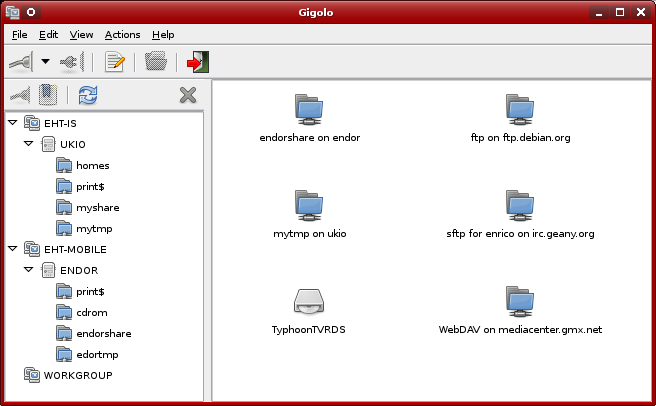
I get why they called it Gigolo. It's the Xfce utility that "mounts anything without complaining."
The things it mounts include ftp and sftp over the network, WebDAV and Windows shares. I'd rather not use it at all, but in Xfce's Thunar file manager, you still need Gigolo to access these remote filesystems.
But since I'm using GNOME and the Nautilus file manager, which is advertised as having baked-in ability to access sftp/ftp and various other networked filesystems, you'd think I'd have no need for Gigolo.
Unfortunately this isn't true.
As often as I create bookmarks in Nautilus to my often-used sftp/ftp sites, they disappear. I don't know why. I've blogged about it recently but find no bug reports.
And though it may be due to the ftp sites I'm using, after a certain period of neglect, during which I don't access a given ftp site after doing so earlier in the session, Nautilus either disconnects or is disconnected from a given ftp server and won't reconnect. Thunar seems to do a better job or reinitiating the connection, but Gigolo is a quick way to "respawn" said ftp connection and get it working again with my file manager, be it Thunar or Nautilus.
But what's really annoying is continually losing my ftp bookmarks in Nautilus. This never happens in Gigolo. It may be awkward, poorly designed and cringe-inducingly named, but it does what it says.
Current time in UTC
Categories
Counter
There are 865 entries in this blog.
There are 294 images in the filesystem, 187 of which appear in actual posts.
Syntax highlighting
I am using Highlight.js for syntax highlighting.
Social updates
As I say at the top of this site, my social-style entries are posted to a separate Ode blog instance at updates.passthejoe.net. The Ruby script I use to do this is pretty ugly, but I released it on Github anyway. I started working on a version that is much more class-based (as in object-oriented), but that project stalled out a bit. I'm considering bringing this concept to Android, or doing it in Java with a JavaFX GUI, or doing it in Node.js for JavaScript practice.
Archive
The archive is not up to date due to the 2020 hosting migration. I plan to work on it.
Hello, world — this is my website
No databases were harmed in the making of this blog
You're seeing this blog, powered by Ode, through the magic of the Perl programming language and the Common Gateway Interface. Also involved: the Apache web server and Linux operating system.
Ode does not use a database to store content. Instead, every entry exists on the web server as a "flat" text file.
Comments are managed via Disqus, integrated through the work of Ode project leader Rob Reed.
Counter and categories: Thanks to Rob Reed for his help on the Counter addin, which provides the post-count and category features seen above. The show/hide feature is coded with inline JavaScript.
E-mail: stevenhrosenberg@gmail.com.
Who am I
and why am I here?
My name is Steven Rosenberg. Journalist. Programmer. Husband. Father. Fixer of the broken.
License
CC BY-NC-SA

Frugal technology, simple living and guerrilla large-appliance repair by Steven Rosenberg is licensed under a Creative Commons Attribution-NonCommercial-ShareAlike 4.0 International License.
Archives
By year and month
Links
My sites
- RSS of this blog
- Microblog of short posts
- Steven Rosenberg (WordPress)
- Click
- Come on Feel the Nuys
- Steven Rosenberg on Twitter
Ode sites
I support the open web
Powered by
