
Regular blog here, 'microblog' there
Many of my traditional blog post live on this site, but a great majority of my social-style posts can be found on my much-busier microbloging site at updates.passthejoe.net. It's busier because my BlogPoster "microblogging" script generates short, Twitter-style posts from the Linux or Windows (or anywhere you can run Ruby with too many Gems) command line, uploads them to the web server and send them out on my Twitter and Mastodon feeds.
I used to post to this blog via scripts and Unix/Linux utilities (curl and Unison) that helped me mirror the files locally and on the server. Since this site recently moved hosts, none of that is set up. I'm just using SFTP and SSH to write posts and manage the site.
Disqus comments are not live just yet because I'm not sure about what I'm going to do for the domain on this site. I'll probably restore the old domain at first just to have some continuity, but for now I like using the "free" domain from this site's new host, NearlyFreeSpeech.net.
 This is a screenshot of the xfdashboard, which is billed as a GNOME Shell-like interface for Xfce
I saw on the Fedora Xfce mailing list today that it looks like xfdashboardand xfce4-whiskermenu-plugin are coming to the Fedora Xfce spin's ISO, if not as default choices at least as things you can add to your desktop after the fact.
I'm a fan of the Whisker Menu, which I already have installed, but I've never heard of xfdashboard, which brings a GNOME Shell-like desktop experience to the world of Xfce. I don't particularly want that, but it's an interesting idea.
I support bringing both of these packages, which are already in the Fedora repositories, to the Fedora Xfce Spin ISO (and therefore the default install), and I encourage you to try them out.
Xfce Theme Manager is kind of a train wreck, but I ended up with borders on the sides of my windows (and that ain't bad)
I was looking through the Fedora packages for Xfce applications I hadn't yet installed, and the Xfce Theme Manager came up.
I installed it. Then I ran it.
It screwed up my desktop. Not all the themes in my system were in the Theme Manager, and I was switched over to one of the few themes that were in there. My icons all grew larger in size. (Thank you very much. I'll be here all week. Please be sure to tip your waitress.)
So I had to re-select the Adiwata theme and manually shrink my icons.
But something good came out of it. For some reason Xfce themes have been "losing" the borders on the left and right sides of windows, and I have no idea now to restore them.
The Xfce Theme Manager has managed to do this for me, and I wouldn't want to reverse this change even if I knew how.
But otherwise the Xfce Theme Manager is trouble. I already removed it.
However, it did get me borders on the left and right sides of windows. And for that it was worth it.
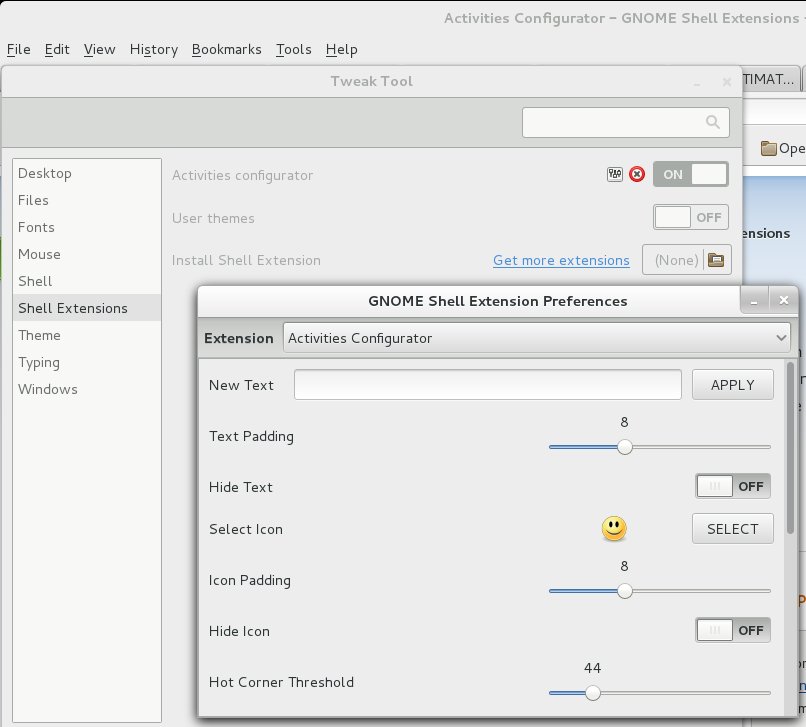 It kept nagging at me. Why was the "hot corner" in Debian's version of GNOME 3 so "sensitive," compared to the GNOME 3 desktop's hot corner in Fedora 19?
In Fedora, I'd mouse into the upper left "hot corner," and half the time wouldn't get the app panel or search box to open. I'd have to "aggressively" mouse to get it working.
So I've been using GNOME 3 less and less. Was it just too slow?
Today I did a bit of searching and found out that "hot corner" sensitivity was something that the user can set, not in stock GNOME 3 but with the Activities Configurator extension.
I installed the extension and cranked the sensitivity number way down, from 100 to 43, making it more sensitive. Now my "hot corner" is much more responsive to mouse movement, and GNOME 3 is easier to use.
Once you have the extension installed, you can access its settings via the GNOME Tweak Tool, or by right-clicking on the "Activities" menu or the little smiley face that now appears to its left.
Those who saw yesterday's entry know that I at once discovered and installed the Xfce Whisker Menu on my Fedora 19 Xfce system.
I already had the standard Xfce Application Finder bound to my alt-F2, alt-F3 and Super (aka "Windows") keys, though I didn't use it that much. What I was going for with the Application Finder being bound to the Super key was Unity/GNOME 3-like functionality in terms of finding and launching applications while retaining the speed and stability of Xfce.
I haven't even used the Whisker Menu for a full day, yet I just used the Xfce Keyboard settings' Application Shortcuts to bind the Whisker Menu to the Super key.
Aside from the Whisker Menu actually working, since it saves me a keystroke/mouse click over the standard Application Finder when searching for and launching an application, I'm pretty much sold on the Whisker Menu.
I'm sold enough that if I find it really working out, I'll remove my application-icon-filled panel on the left side of my screen.
The point: I like the Whisker Menu.
Current time in UTC
Categories
Counter
There are 865 entries in this blog.
There are 294 images in the filesystem, 187 of which appear in actual posts.
Syntax highlighting
I am using Highlight.js for syntax highlighting.
Social updates
As I say at the top of this site, my social-style entries are posted to a separate Ode blog instance at updates.passthejoe.net. The Ruby script I use to do this is pretty ugly, but I released it on Github anyway. I started working on a version that is much more class-based (as in object-oriented), but that project stalled out a bit. I'm considering bringing this concept to Android, or doing it in Java with a JavaFX GUI, or doing it in Node.js for JavaScript practice.
Archive
The archive is not up to date due to the 2020 hosting migration. I plan to work on it.
Hello, world — this is my website
No databases were harmed in the making of this blog
You're seeing this blog, powered by Ode, through the magic of the Perl programming language and the Common Gateway Interface. Also involved: the Apache web server and Linux operating system.
Ode does not use a database to store content. Instead, every entry exists on the web server as a "flat" text file.
Comments are managed via Disqus, integrated through the work of Ode project leader Rob Reed.
Counter and categories: Thanks to Rob Reed for his help on the Counter addin, which provides the post-count and category features seen above. The show/hide feature is coded with inline JavaScript.
E-mail: stevenhrosenberg@gmail.com.
Who am I
and why am I here?
My name is Steven Rosenberg. Journalist. Programmer. Husband. Father. Fixer of the broken.
License
CC BY-NC-SA

Frugal technology, simple living and guerrilla large-appliance repair by Steven Rosenberg is licensed under a Creative Commons Attribution-NonCommercial-ShareAlike 4.0 International License.
Archives
By year and month
Links
My sites
- RSS of this blog
- Microblog of short posts
- Steven Rosenberg (WordPress)
- Click
- Come on Feel the Nuys
- Steven Rosenberg on Twitter
Ode sites
I support the open web
Powered by
