
Regular blog here, 'microblog' there
Many of my traditional blog post live on this site, but a great majority of my social-style posts can be found on my much-busier microbloging site at updates.passthejoe.net. It's busier because my BlogPoster "microblogging" script generates short, Twitter-style posts from the Linux or Windows (or anywhere you can run Ruby with too many Gems) command line, uploads them to the web server and send them out on my Twitter and Mastodon feeds.
I used to post to this blog via scripts and Unix/Linux utilities (curl and Unison) that helped me mirror the files locally and on the server. Since this site recently moved hosts, none of that is set up. I'm just using SFTP and SSH to write posts and manage the site.
Disqus comments are not live just yet because I'm not sure about what I'm going to do for the domain on this site. I'll probably restore the old domain at first just to have some continuity, but for now I like using the "free" domain from this site's new host, NearlyFreeSpeech.net.

Even though I guess I'm a "power user," I'm starting to agree with Steven J. Vaughn-Nichols' idea that Google's Chromebooks are a compelling choice.
If you're comfortable with Google services and doing everything in its cloud, or if you're doing it anyway, these devices are cheap enough, starting at , and due to their light Ubuntu-derived OS boot right away and run acceptably fast. They have a six-hour battery life. From an updates and security perspective, they're virtually maintenance-free.
If you lose one or it breaks, you just move on to a new one. All your stuff is in the cloud.
I'm pitching them to my company. Very soon now, we'll be able to do just about everything we do with a Chromebook. It's cheaper than an iPad, way more usable for things like writing, and the tight integration with Google is a win for those already committed to the search giant's services.

The more I think about it, GNOME's renaming of applications with a clear word as to what they do is a good thing to do.
The file manager Nautilus is now called Files.
The web browser Epiphany is now called Web.
I believe that Totem will eventually be Movies (or something like that).
Sure it makes it hard to manage these applications when you don't have them installed.
But when you install a Linux distribution (or eventually a BSD system that runs GNOME 3) with a complete GNOME environment, users won't be confused and need to scale a steep learning curve to figure out what they need to click to find ... Files. And the Web. And what they need to click to watch video (like "Movies").
I will ignore the fact that Epiphany (now Web) as a browser is not quite ready for prime time, and almost all users will need and want Firefox or Chromium/Chrome (or Opera for those who love Opera). Maybe Epiphany will get up to speed. By that I mean it will get Flash support.
But overall, simple declarative names for core applications is a good idea. Maybe they'll retain their descriptive package names (Epiphany, Nautilus, Totem, Gedit, etc.). Or maybe they'll have a GNOME-appended package name (gnome-web, gnome-files, gnome-movies, gnome-text-editor). That would make package management more sane.
But for users coming to the GNOME desktop for the first time, clear and simple application names gets them going that much faster.
Not all of these sites are the work of self-proclaimed minimalists. Most are. All are worth a look:
The PyBlosxom blogging software isn't dead, but it's not terribly alive either, plus why I use Ode as my flat-file blogging system of choice
PyBlosxom, a very worthy project that took the Perl-based Blosxom and re-did it in Python, has been slow, development-wise, for a long time now.
In recent months the project was near death, but a new maintainer is at least watching over what's left.
Not that Blosxom is an active, living project, because it isn't.
 I spent a brief time years ago pumping the mail from my terrible workplace e-mail server to Gmail, which obliterated many sins (low capacity, terrible software and hardware) while giving rise to others (Google is data-mining us like crazy).
Well, after years of IMAP in Thunderbird, I'm changing course. I'm letting Google's Gmail handle my work mail again.
I'm aware that Google is using my e-mail to craft marketing messages it will aim at me. I don't like it, but I don't hate it enough to suffer through my current mail routine, with the inbox maxing out more days than not. That leads to all sorts of lost productivity on my part.
And my coworkers are making increasing use of Google Drive/Docs, Calendar and Google Plus (with plenty of Google Chat/Talk and Hangouts).
My thinking: If I'm doing all of that, Gmail doesn't add much to the spy vector. And this is for work only. I've been trying to do most of my personal e-mail off of Gmail -- and every other ad-supported e-mail service.
But faced with a poor e-mail system that I must use daily, Gmail makes it much more usable. Google has won me over. Again.

I get offered products for review here and there. Usually those products are hard for me to get excited about.
But a computer built for Linux, assembled in Berkeley, California, by the well-respected ZaReason?
That was exciting.
Cathy Malmrose of ZaReason contacted me through Larry Cafiero, Linux advocate and my Digital First Media / MediaNews Group colleague. Soon enough, the ZaReason Limbo 6000A was on its way to the L.A. Daily News office.
The lowest-priced Limbo 6000A runs a very reasonable . The box sent to me included a few key improvements that brought the price up to .
I know what you're thinking. I could put together my own box from Newegg/TigerDirect parts, or buy a cheaper computer from Dell, HP, Acer, etc. ...
But if you buy from ZaReason (or System 76, or the other Linux- and BSD-loading builder-dealers out there), you are getting systems on which all the hardware is guaranteed to work with free, open-source operating systems. You get actual support. And you don't run the risk of putting together a box from scratch that might not even POST when you turn the power on, not to mention fail to work with the Linux distribution of your choice.
 (Rear of the ZaReason Limbo 6000A)
The $99 supercomputer: Adapteva turns to Kickstarter for funding to get its massively parallel, fully open Raspberry Pi killer off the ground
Above: Adapteva's video of the prototype Parallella board running Ubuntu.
First netbooks died, killing off their Linux origins before that. Then big OEMs flirting with desktop Linux went from bang to whimper with nary a marketing push.
But the bright, shining light in open source hardware -- software-wise anyway, as the hardware ain't all that open -- has been the Raspberry Pi single-board computer that runs Linux, sips power and has a great deal of the world busy crafting enclosures, fine-tuning OS images and basically geeking out.
Not that there's anything wrong with that.
But there will be competitors. Others that want to take the throne.
Chief among complaints about Raspberry Pi is the presence of closed-source chips on the board.

Well along comes Adapteva with an idea for a massively parallel collection of CPUs on a chip (either 16 or 64), also (electrical) power sipping but this time funded by Kickstarter and promising way more processing power, plus a fully open hardware design, all for (for 16 cores) or (for 64 cores).
That's if they get that Kickstarter money and get the project off the ground.
People are thirsting big time for these "supercomputing" ARM platforms, something cheap enough to play a niche role yet powerful enough to actually do some things.
The Parallella Project is looking for ,000 out of Kickstarter to produce the 16-core chip. If things blow up and they get million, they'll produce the 64-core version.
According to the Ubuntu Vibes write-up linked to above, the 16-core version will deliver 13 GHz of CPU performance, and the 64-core version will push 45 GHz. All that in 5 watts of power.
And they're pledging to open-source the hardware if this Kickstarter thing works out.
Lots of updates today in Debian Wheezy, plus when I think it will go Stable and why I stick with Debian as my distro of choice
 Quite a few updates moved for Debian's Wheezy testing branch today. I got a lot of GNOME bits and, for some reason, qemu-kvm.
The Debian Project is pushing Wheezy ever closer to release. The way things are going, counting the number of release-critical bugs and comparing it to roughly the same period before the release of Squeeze (the current Stable release), there are now 243 release-critical bugs remaining to be solved before Wheezy's release can happen. In September 2010, there were 126 RC bugs remaining to be solved.
Squeeze was released in February 2011, and if the RC-bug count is any indication, we won't see Wheezy go Stable this year, even though that was an early goal of the project.
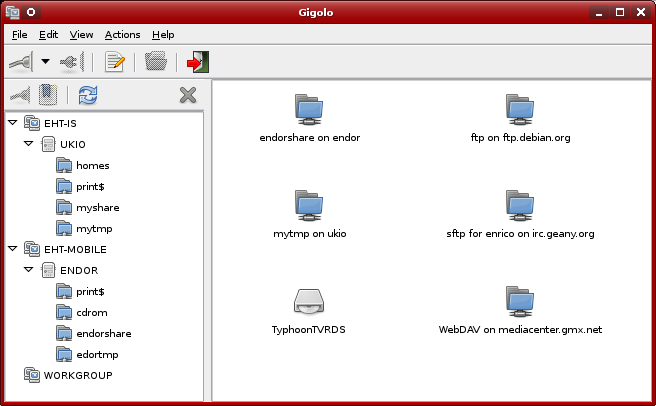
I get why they called it Gigolo. It's the Xfce utility that "mounts anything without complaining."
The things it mounts include ftp and sftp over the network, WebDAV and Windows shares. I'd rather not use it at all, but in Xfce's Thunar file manager, you still need Gigolo to access these remote filesystems.
But since I'm using GNOME and the Nautilus file manager, which is advertised as having baked-in ability to access sftp/ftp and various other networked filesystems, you'd think I'd have no need for Gigolo.
Unfortunately this isn't true.
As often as I create bookmarks in Nautilus to my often-used sftp/ftp sites, they disappear. I don't know why. I've blogged about it recently but find no bug reports.
And though it may be due to the ftp sites I'm using, after a certain period of neglect, during which I don't access a given ftp site after doing so earlier in the session, Nautilus either disconnects or is disconnected from a given ftp server and won't reconnect. Thunar seems to do a better job or reinitiating the connection, but Gigolo is a quick way to "respawn" said ftp connection and get it working again with my file manager, be it Thunar or Nautilus.
But what's really annoying is continually losing my ftp bookmarks in Nautilus. This never happens in Gigolo. It may be awkward, poorly designed and cringe-inducingly named, but it does what it says.
I bit the bullet and did some repartitioning of my Debian Wheezy-running laptop to give myself more space on the Linux side by taking it from the seldom-used Windows side of my dual-boot system.
I had wanted to make my existing Debian partitions bigger, but due to the fact that modifying LVM -- especially with some partitions encrypted -- is a bit too mysterious and difficult, I decided to work with the Windows 7 partitions on the drive instead. Once I shrunk Windows, I planned to use the freed-up space for a new Linux partition. After that I would configure my Debian system to use it.
When I set up this laptop back in 2010, I did a fresh, crapware-free Windows 7 Home Premium installation at the very end of the drive. Windows dumped its main partition and small boot partition right there. At the time I gave something like 100 GB (out of the 320 GB drive) to Windows.
That's where I got my "extra" space for Linux.
Current time in UTC
Categories
Counter
There are 865 entries in this blog.
There are 294 images in the filesystem, 187 of which appear in actual posts.
Syntax highlighting
I am using Highlight.js for syntax highlighting.
Social updates
As I say at the top of this site, my social-style entries are posted to a separate Ode blog instance at updates.passthejoe.net. The Ruby script I use to do this is pretty ugly, but I released it on Github anyway. I started working on a version that is much more class-based (as in object-oriented), but that project stalled out a bit. I'm considering bringing this concept to Android, or doing it in Java with a JavaFX GUI, or doing it in Node.js for JavaScript practice.
Archive
The archive is not up to date due to the 2020 hosting migration. I plan to work on it.
Hello, world — this is my website
No databases were harmed in the making of this blog
You're seeing this blog, powered by Ode, through the magic of the Perl programming language and the Common Gateway Interface. Also involved: the Apache web server and Linux operating system.
Ode does not use a database to store content. Instead, every entry exists on the web server as a "flat" text file.
Comments are managed via Disqus, integrated through the work of Ode project leader Rob Reed.
Counter and categories: Thanks to Rob Reed for his help on the Counter addin, which provides the post-count and category features seen above. The show/hide feature is coded with inline JavaScript.
E-mail: stevenhrosenberg@gmail.com.
Who am I
and why am I here?
My name is Steven Rosenberg. Journalist. Programmer. Husband. Father. Fixer of the broken.
License
CC BY-NC-SA

Frugal technology, simple living and guerrilla large-appliance repair by Steven Rosenberg is licensed under a Creative Commons Attribution-NonCommercial-ShareAlike 4.0 International License.
Archives
By year and month
Links
My sites
- RSS of this blog
- Microblog of short posts
- Steven Rosenberg (WordPress)
- Click
- Come on Feel the Nuys
- Steven Rosenberg on Twitter
Ode sites
I support the open web
Powered by
