
Regular blog here, 'microblog' there
Many of my traditional blog post live on this site, but a great majority of my social-style posts can be found on my much-busier microbloging site at updates.passthejoe.net. It's busier because my BlogPoster "microblogging" script generates short, Twitter-style posts from the Linux or Windows (or anywhere you can run Ruby with too many Gems) command line, uploads them to the web server and send them out on my Twitter and Mastodon feeds.
I used to post to this blog via scripts and Unix/Linux utilities (curl and Unison) that helped me mirror the files locally and on the server. Since this site recently moved hosts, none of that is set up. I'm just using SFTP and SSH to write posts and manage the site.
Disqus comments are not live just yet because I'm not sure about what I'm going to do for the domain on this site. I'll probably restore the old domain at first just to have some continuity, but for now I like using the "free" domain from this site's new host, NearlyFreeSpeech.net.
I like options. And contingency plans.
So I've been adding development tools to my Windows partition (currently stuck on Windows 8 since the 8.1 upgrade won't play nicely with my Win 8/Fedora dual boot).
I upgraded Strawberry Perl, added Ruby and Node, made sure I had the full JDK 8 and removed an older version of Python. I downloaded a new Python but haven't installed it yet (mostly because I'm not using Python at the moment).
I also have Netbeans ready to install, and I'm thinking of giving Geany a try in Windows. I use it a lot, especially these days for Java because I can compile and run in the editor. Otherwise I use Notepad++ for my editing.
I don't have everything working on this side, but I can certainly mess around with Perl, Ruby, Java and JavaScript. I know I could get a full Linux command line environment with Cygwin, and while I'm not yet ready to say that defeats one purpose or other, it's not something I'm considering at this particular moment.
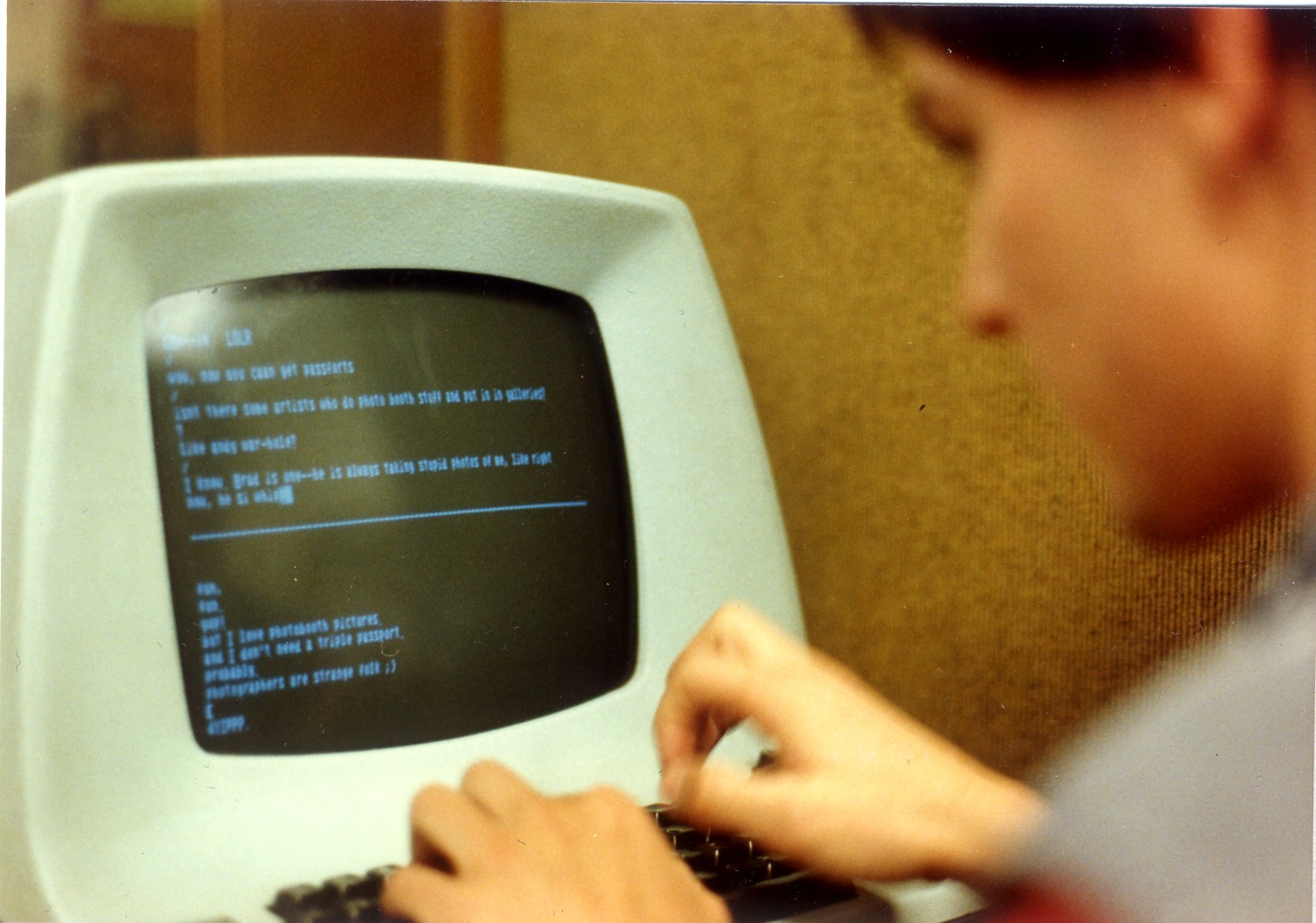
That's me on an ADM-3A terminal at UC Santa Cruz some time in the late '80s. I'm using whatever version of Unix the university had at the time. I can see from the screen that I'm running the talk program with one of my friends on UCSC's Unix B system.
Unlike the other Unix machines (all named with various letters), Unix B was open to anybody who wanted to start an account.
With the help of a photocopied manual called "Unix for Luddites,"available for a couple bucks at the campus' Bay Tree Bookstore, you could learn vi for writing, nroff for formatting and a smattering of shell commands to get your papers printed on a mysterious, before-its-time laser printer somewhere deep in the campus computer center. Your work would eventually end up in cubby holes for later pickup.
While the ADM-3A was the coolest, most retro-looking terminal, even back then you were a little lucky if a DEC VT100 (or similar) was available. Its screen was green and clearer, its keyboard less mushy.
You were really lucky if one of the even-newer Wyse (unsure of model numbers) terminals was in your college's computer room (or the college next to yours; though a Porter student, I gravitated toward Kresge's much better computer lab/room). The Wyse terminals had amber screens that were even clearer than those of the DECs and (more importantly) featured nice, clicky keyboards.
But for sheer design, the ADM-3A was (and is) a classic.
Current time in UTC
Categories
Counter
There are 865 entries in this blog.
There are 294 images in the filesystem, 187 of which appear in actual posts.
Syntax highlighting
I am using Highlight.js for syntax highlighting.
Social updates
As I say at the top of this site, my social-style entries are posted to a separate Ode blog instance at updates.passthejoe.net. The Ruby script I use to do this is pretty ugly, but I released it on Github anyway. I started working on a version that is much more class-based (as in object-oriented), but that project stalled out a bit. I'm considering bringing this concept to Android, or doing it in Java with a JavaFX GUI, or doing it in Node.js for JavaScript practice.
Archive
The archive is not up to date due to the 2020 hosting migration. I plan to work on it.
Hello, world — this is my website
No databases were harmed in the making of this blog
You're seeing this blog, powered by Ode, through the magic of the Perl programming language and the Common Gateway Interface. Also involved: the Apache web server and Linux operating system.
Ode does not use a database to store content. Instead, every entry exists on the web server as a "flat" text file.
Comments are managed via Disqus, integrated through the work of Ode project leader Rob Reed.
Counter and categories: Thanks to Rob Reed for his help on the Counter addin, which provides the post-count and category features seen above. The show/hide feature is coded with inline JavaScript.
E-mail: stevenhrosenberg@gmail.com.
Who am I
and why am I here?
My name is Steven Rosenberg. Journalist. Programmer. Husband. Father. Fixer of the broken.
License
CC BY-NC-SA

Frugal technology, simple living and guerrilla large-appliance repair by Steven Rosenberg is licensed under a Creative Commons Attribution-NonCommercial-ShareAlike 4.0 International License.
Archives
By year and month
Links
My sites
- RSS of this blog
- Microblog of short posts
- Steven Rosenberg (WordPress)
- Click
- Come on Feel the Nuys
- Steven Rosenberg on Twitter
Ode sites
I support the open web
Powered by
